Bilgisayarın IP Adresini Görme
Bilgisayarımızın ip adresini görmek için çeşitli yöntemler var, biz burada cmd üzerinden ip öğrenme metodlarını göreceğiz.
Bilmeyenler için öncelikle;
1-Başlat menüsü>cmd yazıp enter basın.
2-Gelen komut satırına “ipconfig” yazın.Aşağıdaki gibi bilgisayarınızın ip adresini göreceksiniz.
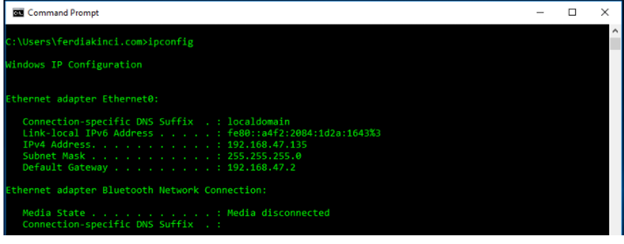
IPv4 Address yazan satırdaki ip adresi sizin bilgisayarınızın local(yerel) ip adresidir.
3-ipconfig komutunu parametreleri ile kullanmak için;
ipconfig /? ile parametreleri görebilirsiniz.
C:\Users\ferdiakinci.com\ipconfig /?
USAGE:
ipconfig [/allcompartments] [/? | /all |
/renew [adapter] | /release [adapter] |
/renew6 [adapter] | /release6 [adapter] |
/flushdns | /displaydns | /registerdns |
/showclassid adapter |
/setclassid adapter [classid] |
/showclassid6 adapter |
/setclassid6 adapter [classid] ]where
adapter Connection name
(wildcard characters * and ? allowed, see examples)
where
adapter Connection name
(wildcard characters * and ? allowed, see examples)
Options:
   /?               Display this help message
   /all             Display full configuration information.
   /release         Release the IPv4 address for the specified adapter.
   /release6        Release the IPv6 address for the specified adapter.
   /renew           Renew the IPv4 address for the specified adapter.
   /renew6          Renew the IPv6 address for the specified adapter.
   /flushdns        Purges the DNS Resolver cache.
   /registerdns     Refreshes all DHCP leases and re-registers DNS names
   /displaydns      Display the contents of the DNS Resolver Cache.
   /showclassid     Displays all the dhcp class IDs allowed for adapter.
   /setclassid      Modifies the dhcp class id.
   /showclassid6    Displays all the IPv6 DHCP class IDs allowed for adapter.
   /setclassid6     Modifies the IPv6 DHCP class id.
The default is to display only the IP address, subnet mask and
default gateway for each adapter bound to TCP/IP.
For Release and Renew, if no adapter name is specified, then the IP address leases for all adapters bound to TCP/IP will be released or renewed.
For Setclassid and Setclassid6, if no ClassId is specified, then the ClassId is removed.
Examples:
> ipconfig … Show information
> ipconfig /all … Show detailed information
> ipconfig /renew … renew all adapters
> ipconfig /renew EL* … renew any connection that has its
name starting with EL
> ipconfig /release Con … release all matching connections,
eg. "Wired Ethernet Connection 1" or
"Wired Ethernet Connection 2"
> ipconfig /allcompartments … Show information about all
compartments
> ipconfig /allcompartments /all … Show detailed information about all
compartments
4-ipconfig /all –> ip adresinizin tüm detaylarını size gösterir. (ip adres, dns, gateway)
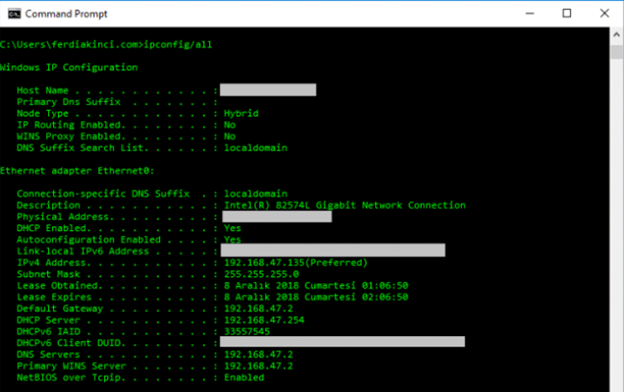
Buraya kadar bilgisayarımızın local ip adres bilgilerini gördük.
Aşağıdaki komut ile modemimizin global (dış) ip adresini görebilirsiniz.
C:\Users\ferdiakinci.com>nslookup myip.opendns.com resolver1.opendns.com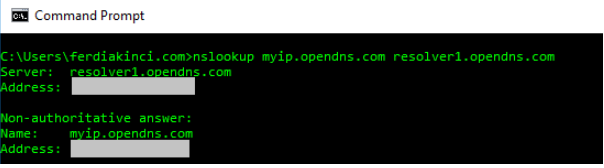
Bu yazımızda ip bilgilerini öğrenmiş olduk. Bir sonraki yazımızda görüşmek üzere.. Esenlikle kalınız..

Bir yanıt yazın